Creare automaticamente i metadati di The SEO Framework per Bricks con Claude
Usare Claude per generare automaticamente i metadati di SEO Framework a partire dal contenuto degli elementi di testo Bricks






Possiamo usare Claude con l'estensione Bricks per generare i metadati di The SEO Framework a partire dal contenuto degli elementi di testo Bricks, il tutto con una sola query Gato GraphQL.
E con l'estensione Automation, possiamo attivare automaticamente l'esecuzione di questa query quando viene pubblicata una nuova pagina Bricks.
Questa query usa Claude per analizzare il contenuto degli elementi di testo Bricks e generare i metadati di The SEO Framework (titolo e descrizione) per migliorare il SEO.
Dobbiamo fornire le seguenti variabili:
customPostId: L'ID del custom post Bricks da aggiornareanthropicAPIKey: La chiave API per l'API Anthropic
Puoi personalizzare il messaggio di sistema e il modello di prompt per regolare il modo in cui Claude genera i metadati.
Salva la query come una nuova Persisted Query, con il titolo "Create The SEO Framework metadata for Bricks with Claude", in modo da poterla usare nell'Automation (vedi sotto).
Ecco la query GraphQL:
query InitializeGlobalVariables
@configureWarningsOnExportingDuplicateVariable(enabled: false)
{
emptyArray: _echo(value: [])
@export(as: "elementTexts")
@remove
}
query GetBricksData($customPostId: ID!)
@depends(on: "InitializeGlobalVariables")
{
customPost(by:{ id: $customPostId }, status: any) {
id
title
bricksData(filterBy: { include: ["heading", "text"] })
@underEachArrayItem
@underJSONObjectProperty(by: { path: "settings.text" })
@export(as: "elementTexts")
}
}
query GenerateMetadataWithClaude(
$anthropicAPIKey: String!
$maxTokens: Int! = 32000
$promptTemplate: String! = """
You are an SEO expert specializing in metadata optimization.
I need to generate SEO metadata for a WordPress page using The SEO Framework plugin.
Based on the following content from the page, please generate:
1. A compelling SEO title (max 60 chars)
2. A meta description (max 160 chars)
Please respond in JSON format with this structure:
{
"title": "SEO title here",
"description": "Meta description here"
}
Return ONLY the JSON object. Do not include any explanations, markdown formatting, or code blocks. The response must be a valid JSON object starting with { and ending with }.
Content to analyze:
{$encodedContent}
"""
$model: String! = "claude-sonnet-4-0"
)
@depends(on: "GetBricksData")
{
encodedContent: _arrayJoin(
array: $elementTexts,
separator: "\n\n"
)
prompt: _strReplace(
search: "{$encodedContent}",
replaceWith: $__encodedContent,
in: $promptTemplate
)
claudeResponse: _sendJSONObjectItemHTTPRequest(input: {
url: "https://api.anthropic.com/v1/messages",
method: POST,
options: {
headers: [
{
name: "x-api-key",
value: $anthropicAPIKey
},
{
name: "anthropic-version",
value: "2023-06-01"
}
],
json: {
model: $model,
max_tokens: $maxTokens,
messages: [
{
role: "user",
content: $__prompt
}
],
}
}
})
@underJSONObjectProperty(by: { key: "content" })
@underArrayItem(index: 0)
@underJSONObjectProperty(by: { key: "text" })
@export(as: "jsonEncodedMetadata")
}
query ExtractMetadata
@depends(on: "GenerateMetadataWithClaude")
{
jsonEncodedMetadata: _echo(value: $jsonEncodedMetadata)
@remove
decodedMetadata: _strDecodeJSONObject(string: $jsonEncodedMetadata)
seoMetadataTitle: _objectProperty(
object: $__decodedMetadata,
by: { key: "title" }
)
@export(as: "seoMetadataTitle")
seoMetadataDescription: _objectProperty(
object: $__decodedMetadata,
by: { key: "description" }
)
@export(as: "seoMetadataDescription")
}
mutation UpdateSEOFrameworkMetadata($customPostId: ID!)
@depends(on: "ExtractMetadata")
{
updateCustomPost(
input: {
id: $customPostId
meta: {
_genesis_title: [$seoMetadataTitle],
_genesis_description: [$seoMetadataDescription],
_open_graph_title: [$seoMetadataTitle],
_open_graph_description: [$seoMetadataDescription],
_twitter_title: [$seoMetadataTitle],
_twitter_description: [$seoMetadataDescription],
}
}
) {
status
errors {
__typename
...on ErrorPayload {
message
}
}
customPost {
id
metaTitle: metaValue(key: "_genesis_title")
metaDesc: metaValue(key: "_genesis_description")
socialTitle: metaValue(key: "_open_graph_title")
socialDesc: metaValue(key: "_open_graph_description")
twitterTitle: metaValue(key: "_twitter_title")
twitterDesc: metaValue(key: "_twitter_description")
}
}
}Le variabili sarebbero così:
{
"customPostId": 123,
"anthropicAPIKey": "sk-ant-..."
}Automation
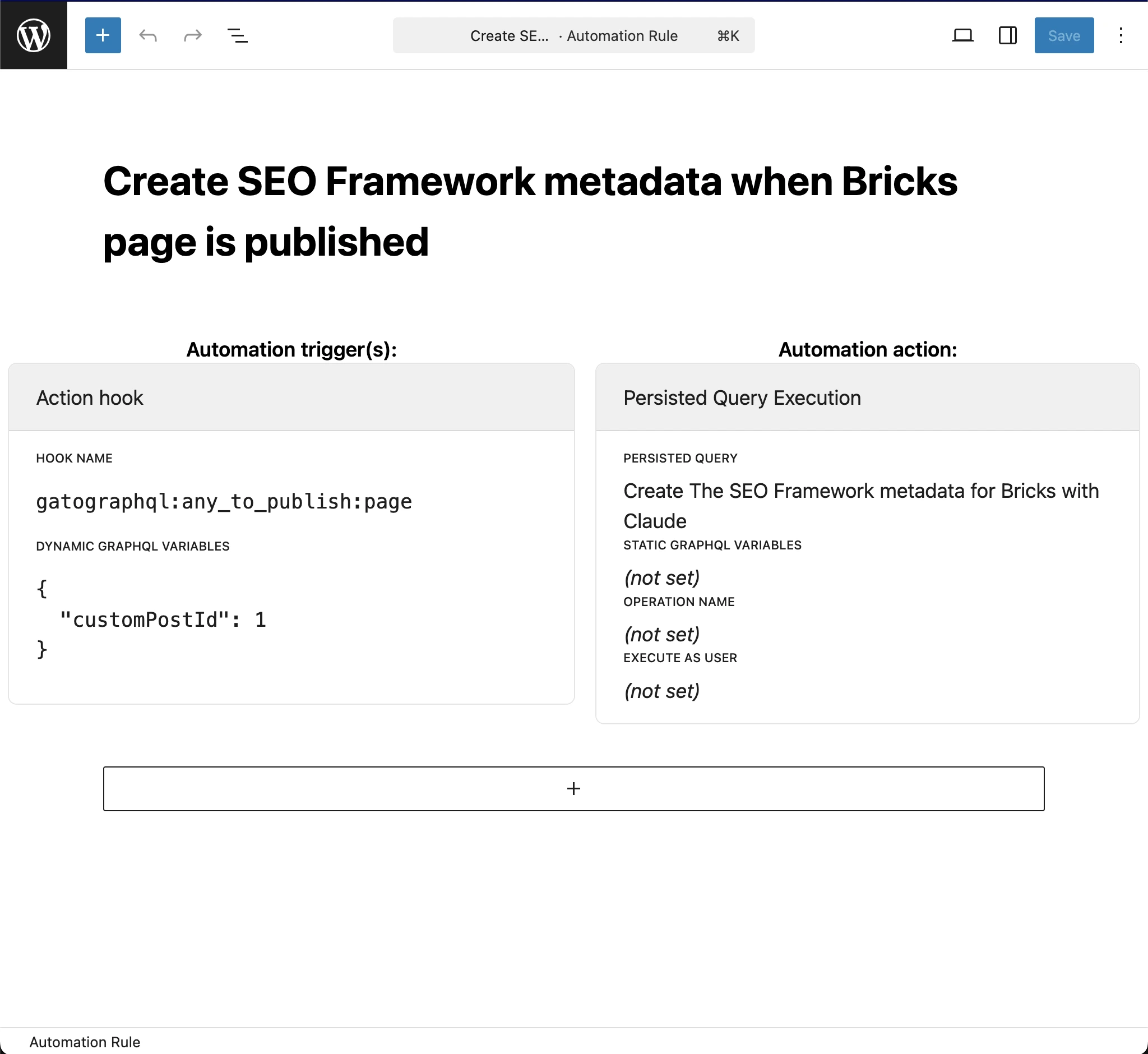
Per attivare automaticamente l'esecuzione della query quando viene pubblicata una nuova pagina Bricks, crea una nuova regola di Automation con le seguenti impostazioni:
- Persisted Query:
"Create The SEO Framework metadata for Bricks with Claude"(cioè quella che abbiamo creato sopra) - Hook name:
gatographql:any_to_publish:page - Dynamic GraphQL variables:
{
"customPostId": 1
}