

Lezione 15: Invio di un riepilogo quotidiano di attività
Possiamo integrare Gato GraphQL con WP-Cron, per automatizzare l'esecuzione di queries GraphQL che svolgono attività amministrative, con un determinato intervallo di tempo. (È richiesta l'estensione Automazione.)
In questa lezione del tutorial, configuriamo WP-Cron per eseguire ogni 24 ore una query GraphQL che recupera il numero di nuovi commenti aggiunti al sito e invia queste statistiche all'account e-mail desiderato.
Query GraphQL con le statistiche quotidiane dei nuovi commenti
Questa query GraphQL invia un'e-mail che indica il numero di nuovi commenti aggiunti al sito per diversi periodi di tempo:
- Nelle ultime 24 ore
- Nell'ultimo anno
- Dall'inizio del mese
- Dall'inizio dell'anno
Creiamo una Persisted Query con slug "daily-stats-by-email-number-of-comments" e il seguente contenuto:
query CountComments {
DATE_ISO8601: _env(name: DATE_ISO8601) @remove
timeToday: _time
dateToday: _date(format: $__DATE_ISO8601, timestamp: $__timeToday)
timeYesterday: _intSubtract(subtract: 86400, from: $__timeToday)
dateYesterday: _date(format: $__DATE_ISO8601, timestamp: $__timeYesterday)
time1YearAgo: _intSubtract(subtract: 31536000, from: $__timeToday)
date1YearAgo: _date(format: $__DATE_ISO8601, timestamp: $__time1YearAgo)
timeBegOfThisMonth: _makeTime(hour: 0, minute: 0, second: 0, day: 1)
dateBegOfThisMonth: _date(format: $__DATE_ISO8601, timestamp: $__timeBegOfThisMonth)
timeBegOfThisYear: _makeTime(hour: 0, minute: 0, second: 0, month: 1, day: 1)
dateBegOfThisYear: _date(format: $__DATE_ISO8601, timestamp: $__timeBegOfThisYear)
commentsAddedInLast24Hs: commentCount(filter: { dateQuery: { after: $__dateYesterday } } )
@export(as: "commentsAddedInLast24Hs")
commentsAddedInLast1Year: commentCount(filter: { dateQuery: { after: $__date1YearAgo } } )
@export(as: "commentsAddedInLast1Year")
commentsAddedSinceBegOfThisMonth: commentCount(filter: { dateQuery: { after: $__dateBegOfThisMonth } } )
@export(as: "commentsAddedSinceBegOfThisMonth")
commentsAddedSinceBegOfThisYear: commentCount(filter: { dateQuery: { after: $__dateBegOfThisYear } } )
@export(as: "commentsAddedSinceBegOfThisYear")
}
query CreateEmailMessage @depends(on: "CountComments") {
emailMessageTemplate: _strConvertMarkdownToHTML(
text: """
This is the number of comments added to the site:
| Period | # Comments added |
| --- | --- |
| **In the last 24 hs**: | {$commentsAddedInLast24Hs} |
| **In the last 365 days**: | {$commentsAddedInLast1Year} |
| **Since begginning of this month**: | {$commentsAddedSinceBegOfThisMonth} |
| **Since begginning of this year**: | {$commentsAddedSinceBegOfThisYear} |
"""
)
emailMessage: _strReplaceMultiple(
search: [
"{$commentsAddedInLast24Hs}",
"{$commentsAddedInLast1Year}",
"{$commentsAddedSinceBegOfThisMonth}",
"{$commentsAddedSinceBegOfThisYear}"
],
replaceWith: [
$commentsAddedInLast24Hs,
$commentsAddedInLast1Year,
$commentsAddedSinceBegOfThisMonth,
$commentsAddedSinceBegOfThisYear
],
in: $__emailMessageTemplate
)
@export(as: "emailMessage")
}
mutation SendDailyStatsByEmailNumberOfComments(
$to: [String!]!
)
@depends(on: "CreateEmailMessage")
{
_sendEmail(
input: {
to: $to
subject: "Daily stats: Number of new comments"
messageAs: {
html: $emailMessage
}
}
) {
status
}
}Pianificazione dell'esecuzione della query GraphQL tramite WP-Cron
Dobbiamo pianificare l'evento WP-Cron per eseguire il hook Gato GraphQL gatographql__execute_persisted_query, passando come argomento l'indirizzo e-mail a cui inviare il messaggio e la ricorrenza (giornaliera).
Possiamo farlo tramite PHP:
wp_schedule_event(
time(),
'daily',
'gatographql__execute_persisted_query',
[
'daily-stats-by-email-number-of-comments',
[
'to' => ['admin@mysite.com']
],
'SendDailyStatsByEmailNumberOfComments',
1 // This is the admin user's ID
]
);Oppure tramite il plugin WP-Crontrol:
- Event type: Standard cron event
- Hook name:
gatographql__execute_persisted_query - Arguments:
["daily-stats-by-email-number-of-comments",{"to":["admin@mysite.com"]},"SendDailyStatsByEmailNumberOfComments",1] - Recurrence: Once Daily
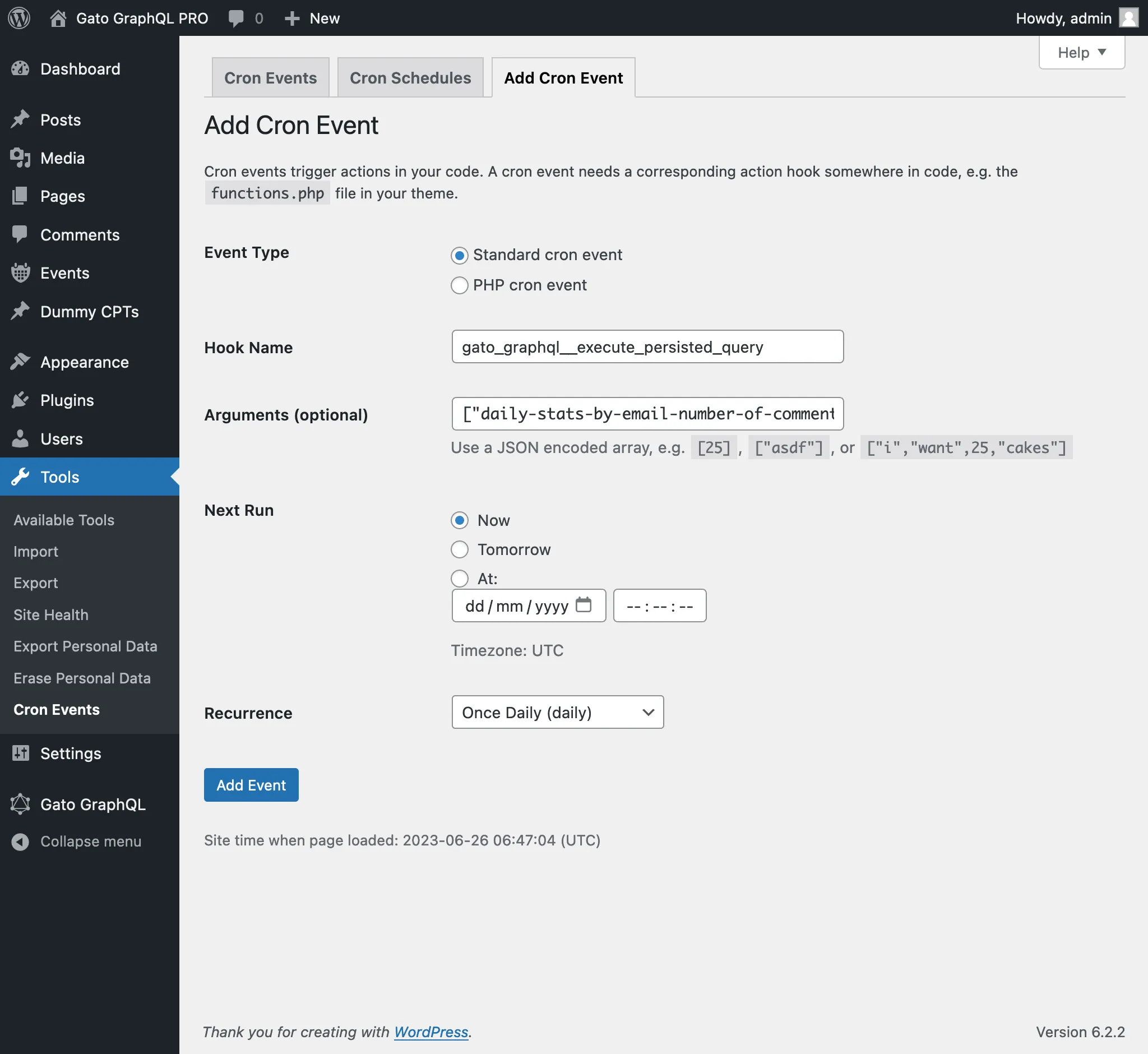
Il 4° argomento passato all'evento WP-Cron è l'ID (come int) o il nome utente (come string) dell'utente che deve essere autenticato durante l'esecuzione della query GraphQL.
(In questo caso, il valore 1 è l'ID dell'utente amministratore; sarebbe stato possibile fornire anche il nome utente "admin".)
Passare questo argomento è generalmente necessario quando si eseguono mutazioni, poiché la maggior parte di esse richiede che un utente (con le capacità appropriate) sia autenticato.