

Client HTTP
Aggiunta di campi allo schema GraphQL per eseguire richieste HTTP verso un server web e recuperarne la risposta:
_sendJSONObjectItemHTTPRequest_sendJSONObjectItemHTTPRequests_sendJSONObjectCollectionHTTPRequest_sendJSONObjectCollectionHTTPRequests_sendHTTPRequest_sendHTTPRequests_sendGraphQLHTTPRequest_sendGraphQLHTTPRequests
Per motivi di sicurezza, gli URL a cui è possibile connettersi devono essere configurati esplicitamente.
Elenco dei campi
I campi seguenti vengono aggiunti allo schema.
_sendJSONObjectItemHTTPRequest
Recupera la risposta (REST) per un singolo oggetto JSON.
Signature: _sendJSONObjectItemHTTPRequest(input: HTTPRequestInput!): JSONObject.
_sendJSONObjectItemHTTPRequests
Recupera la risposta (REST) per un singolo oggetto JSON da più endpoint, eseguiti in modo asincrono (in parallelo) o sincrono (uno dopo l'altro).
Signature: _sendJSONObjectItemHTTPRequests(async: Boolean = true, inputs: [HTTPRequestInput!]!): [JSONObject].
_sendJSONObjectCollectionHTTPRequest
Recupera la risposta (REST) per una collezione di oggetti JSON.
Signature: _sendJSONObjectCollectionHTTPRequest(input: HTTPRequestInput!): [JSONObject].
_sendJSONObjectCollectionHTTPRequests
Recupera la risposta (REST) per una collezione di oggetti JSON da più endpoint, eseguiti in modo asincrono (in parallelo) o sincrono (uno dopo l'altro).
Signature: _sendJSONObjectCollectionHTTPRequests(async: Boolean = true, inputs: [HTTPRequestInput!]!): [[JSONObject]].
_sendHTTPRequest
Si connette all'URL specificato e recupera un oggetto HTTPResponse, che contiene i campi seguenti:
statusCode: Int!contentType: String!body: String!headers: JSONObject!header(name: String!): StringhasHeader(name: String!): Boolean!
Signature: _sendHTTPRequest(input: HTTPRequestInput!): HTTPResponse.
_sendHTTPRequests
Simile a _sendHTTPRequest ma riceve più URL, e consente di connettersi ad essi in modo asincrono (in parallelo).
Signature: _sendHTTPRequests(async: Boolean = true, inputs: [HTTPRequestInput!]!): [HTTPResponse].
_sendGraphQLHTTPRequest
Esegue una query GraphQL verso l'endpoint fornito, e recupera la risposta sotto forma di oggetto JSON.
L'input di questo campo accetta i dati attesi per GraphQL: l'endpoint, la query GraphQL, le variabili e il nome dell'operazione, e imposta già il metodo predefinito (POST) e il content type (application/json).
Signature: _sendGraphQLHTTPRequest(input: GraphQLRequestInput!): JSONObject.
_sendGraphQLHTTPRequests
Simile a _sendGraphQLHTTPRequests ma esegue più query GraphQL in modo concorrente, sia in modo asincrono (in parallelo) sia in modo sincrono (una dopo l'altra).
Signature: _sendGraphQLHTTPRequests(async: Boolean = true, inputs: [GraphQLRequestInput!]!): JSONObject.
Configurazione degli URL autorizzati
Dobbiamo configurare l'elenco degli URL a cui possiamo connetterci.
Ogni voce può essere:
- Una regex (espressione regolare), se è racchiusa tra
/o#, oppure - L'URL completo, altrimenti
Ad esempio, una qualsiasi di queste voci corrisponde all'URL "https://gatographql.com/recipes/":
https://gatographql.com/recipes/#https://gatographql.com/recipes/?##https://gatographql.com/.*#/https:\\/\\/gatographql.com\\/(\S+)/
Ci sono 2 punti in cui questa configurazione può avvenire, in ordine di priorità:
- Personalizzata: Nella Configurazione dello schema corrispondente
- Generale: Nella pagina delle Impostazioni
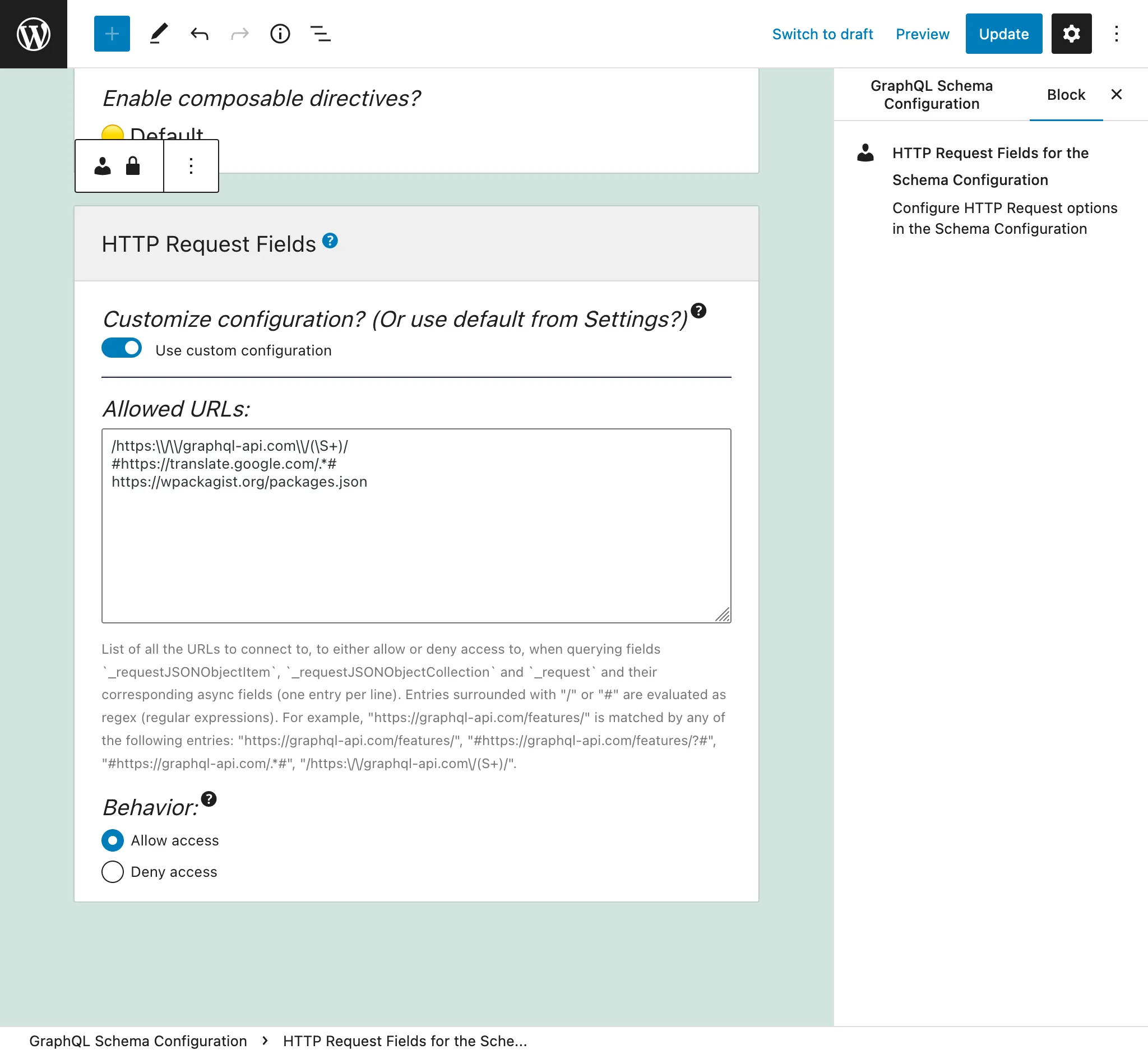
Nella Configurazione dello schema applicata all'endpoint, selezionate l'opzione "Use custom configuration" e poi inserite le voci desiderate:
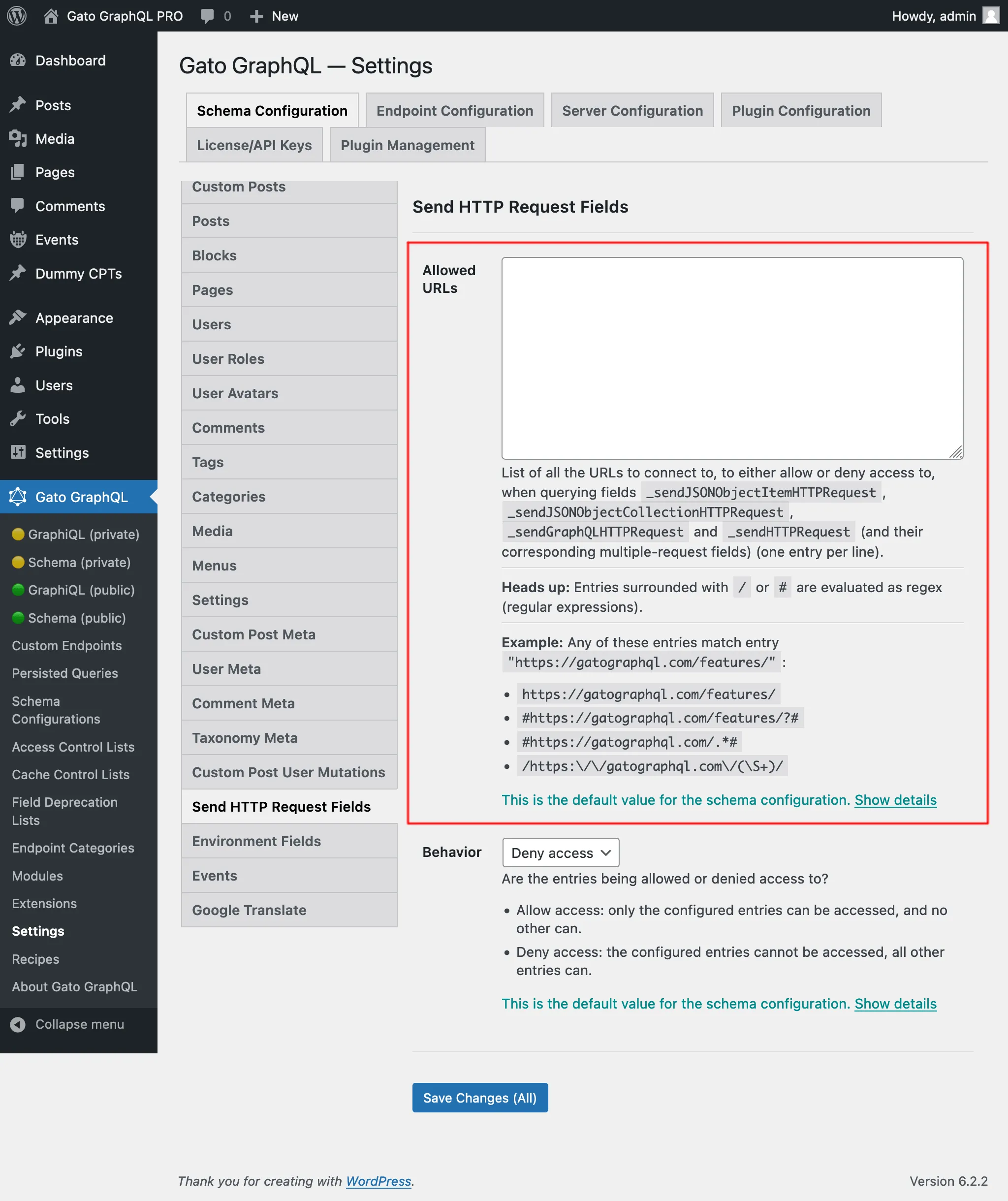
Altrimenti, verranno utilizzate le voci definite nella scheda "Send HTTP Request Fields" delle Impostazioni:
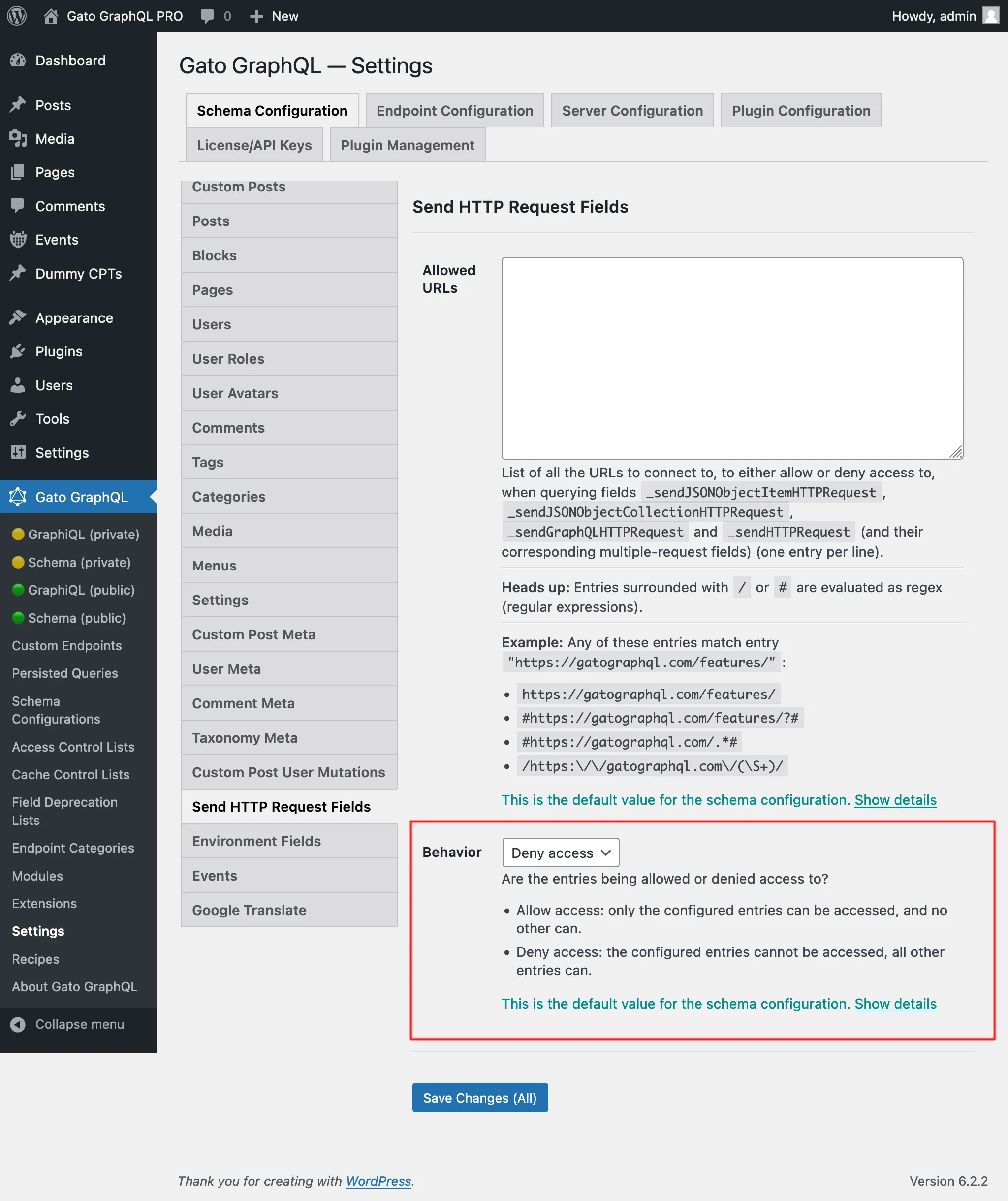
Ci sono 2 comportamenti, "Allow access" e "Deny access":
- Allow access: solo le voci configurate sono accessibili, nessun'altra lo è
- Deny access: le voci configurate non sono accessibili, tutte le altre lo sono
Capacità richiesta per accedere agli URL interni
Alcuni URL si risolvono in indirizzi interni (127.0.0.1, intervalli link-local, endpoint di cloud-metadata, ecc.) che possono esporre servizi interni se raggiunti. Questa impostazione è configurata nella pagina delle Impostazioni, sotto Plugin Configuration > HTTP Client.
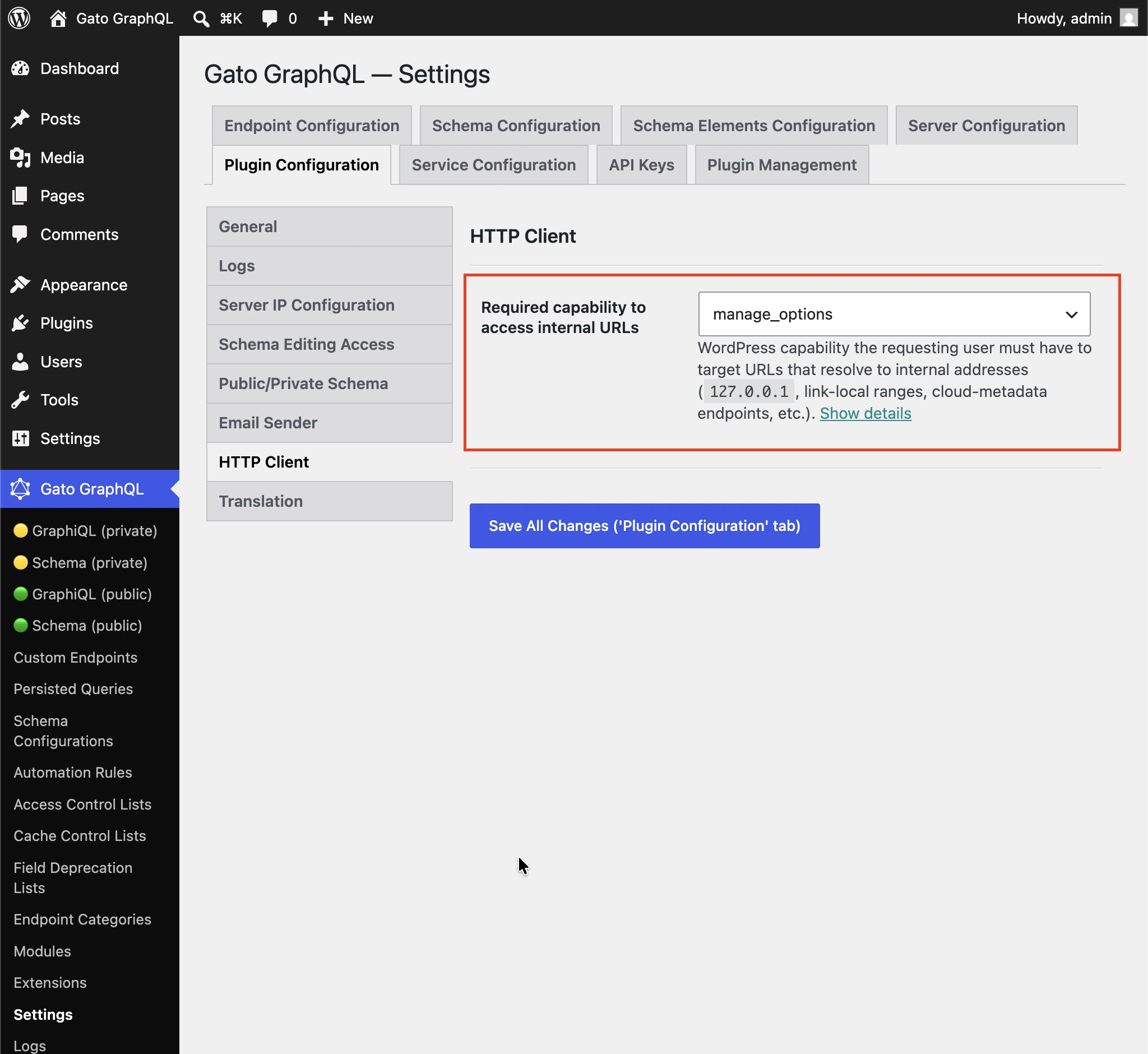
Capacità WordPress che l'utente richiedente deve avere per puntare a URL che si risolvono in indirizzi interni (127.0.0.1, intervalli link-local, endpoint di cloud-metadata, ecc.).
Per impostazione predefinita manage_options, affinché gli utenti non amministratori non possano raggiungere i servizi interni tramite i campi del Client HTTP.
Selezionate (qualsiasi utente autenticato) per disabilitare il controllo della capacità.
Quando usare ciascun campo
Tutti i campi sono simili ma diversi.
_sendJSONObjectItemHTTPRequest
Questo campo recupera un elemento di oggetto JSON, il che è utile quando si interroga un singolo elemento da un endpoint REST, come dall'endpoint della WP REST API /wp-json/wp/v2/posts/1/.
Questa query:
{
postData: _sendJSONObjectItemHTTPRequest(input: { url: "https://newapi.getpop.org/wp-json/wp/v2/posts/1/" } )
}...recupera questa risposta:
{
"data": {
"postData": {
"id": 1,
"date": "2019-08-02T07:53:57",
"date_gmt": "2019-08-02T07:53:57",
"guid": {
"rendered": "https:\/\/newapi.getpop.org\/?p=1"
},
"modified": "2021-01-14T13:18:39",
"modified_gmt": "2021-01-14T13:18:39",
"slug": "hello-world",
"status": "publish",
"type": "post",
"link": "https:\/\/newapi.getpop.org\/uncategorized\/hello-world\/",
"title": {
"rendered": "Hello world!"
},
"content": {
"rendered": "\n<p>Welcome to WordPress. This is your first post. Edit or delete it, then start writing!<\/p>\n\n\n\n<p>I’m demonstrating a Youtube video:<\/p>\n\n\n\n<figure class=\"wp-block-embed is-type-video is-provider-youtube wp-block-embed-youtube wp-embed-aspect-16-9 wp-has-aspect-ratio\"><div class=\"wp-block-embed__wrapper\">\n<iframe loading=\"lazy\" title=\"Introduction to the Component-based API by Leonardo Losoviz | JSConf.Asia 2019\" width=\"750\" height=\"422\" src=\"https:\/\/www.youtube.com\/embed\/9pT-q0SSYow?feature=oembed\" frameborder=\"0\" allow=\"accelerometer; autoplay; clipboard-write; encrypted-media; gyroscope; picture-in-picture\" allowfullscreen><\/iframe>\n<\/div><figcaption>This is my presentation in JSConf Asia 2019<\/figcaption><\/figure>\n",
"protected": false
},
"excerpt": {
"rendered": "<p>Welcome to WordPress. This is your first post. Edit or delete it, then start writing! I’m demonstrating a Youtube video:<\/p>\n",
"protected": false
},
"author": 1,
"featured_media": 0,
"comment_status": "closed",
"ping_status": "open",
"sticky": false,
"template": "",
"format": "standard",
"meta": [],
"categories": [
1
],
"tags": [
193,
173
]
}
}
}_sendJSONObjectCollectionHTTPRequest
Questo campo è simile a _sendJSONObjectItemHTTPRequest, ma recupera una collezione di oggetti JSON, come dall'endpoint della WP REST API /wp-json/wp/v2/posts/.
Questa query:
{
postData: _sendJSONObjectItemHTTPRequest(input: { url: "https://newapi.getpop.org/wp-json/wp/v2/posts/?per_page=3&_fields=id,type,title,date" } )
}...recupera questa risposta:
{
"data": {
"postData": [
{
"id": 1692,
"date": "2022-04-26T10:10:08",
"type": "post",
"title": {
"rendered": "My Blogroll"
}
},
{
"id": 1657,
"date": "2020-12-21T08:24:18",
"type": "post",
"title": {
"rendered": "A tale of two cities – teaser"
}
},
{
"id": 1499,
"date": "2019-08-08T02:49:36",
"type": "post",
"title": {
"rendered": "COPE with WordPress: Post demo containing plenty of blocks"
}
}
]
}
}_sendHTTPRequest
Questo campo recupera un oggetto HTTPResponse con tutte le proprietà della risposta, in modo da poter interrogare indipendentemente il body (che è di tipo String, ovvero non viene castato in JSON), il codice di stato, il content type e gli header.
Ad esempio, la query seguente:
{
_sendHTTPRequest(
input: {
url: "https://newapi.getpop.org/wp-json/wp/v2/comments/11/?_fields=id,date,content"
}
) {
statusCode
contentType
headers
body
contentLengthHeader: header(name: "Content-Length")
cacheControlHeader: header(name: "Cache-Control")
}
}...restituisce questa risposta:
{
"data": {
"_sendHTTPRequest": {
"statusCode": 200,
"contentType": "application\/json; charset=UTF-8",
"headers": {
"Access-Control-Allow-Headers": "Authorization, X-WP-Nonce, Content-Disposition, Content-MD5, Content-Type",
"Access-Control-Expose-Headers": "X-WP-Total, X-WP-TotalPages, Link",
"Allow": "GET",
"Cache-Control": "max-age=300,no-store",
"Content-Length": "508"
},
"body": "{\"id\":11,\"date\":\"2020-12-12T04:09:36\",\"content\":{\"rendered\":\"<p>Wow, this sounds awesome!<\\\/p>\\n\"},\"_links\":{\"self\":[{\"href\":\"https:\\\/\\\/newapi.getpop.org\\\/wp-json\\\/wp\\\/v2\\\/comments\\\/11\"}],\"collection\":[{\"href\":\"https:\\\/\\\/newapi.getpop.org\\\/wp-json\\\/wp\\\/v2\\\/comments\"}],\"author\":[{\"embeddable\":true,\"href\":\"https:\\\/\\\/newapi.getpop.org\\\/wp-json\\\/wp\\\/v2\\\/users\\\/3\"}],\"up\":[{\"embeddable\":true,\"post_type\":\"post\",\"href\":\"https:\\\/\\\/newapi.getpop.org\\\/wp-json\\\/wp\\\/v2\\\/posts\\\/28\"}]}}",
"contentLengthHeader": "508",
"cacheControlHeader": "max-age=300,no-store"
}
}
}_sendGraphQLHTTPRequest
Eseguendo la query seguente:
{
graphQLRequest: _sendGraphQLHTTPRequest(
input: {
endpoint: "https://newapi.getpop.org/api/graphql/"
query: """
query GetPosts($postIDs: [ID]!) {
posts(filter: { ids: $postIDs }) {
id
title
}
}
"""
variables: [
{
name: "postIDs",
value: [1, 1499]
}
]
}
)
}...restituisce la risposta seguente:
{
"data": {
"graphQLRequest": {
"data": {
"posts": [
{
"id": 1499,
"title": "COPE with WordPress: Post demo containing plenty of blocks"
},
{
"id": 1,
"title": "Hello world!"
}
]
}
}
}
}Campi a richieste multiple: _sendJSONObjectItemHTTPRequests, _sendJSONObjectCollectionHTTPRequests, _sendGraphQLHTTPRequests e _sendHTTPRequests
Questi campi funzionano in modo simile ai loro campi non multipli corrispondenti, ma recuperano dati da più endpoint contemporaneamente, sia in modo asincrono (in parallelo) sia in modo sincrono (uno dopo l'altro). Le risposte sono collocate in una lista, nello stesso ordine in cui gli URL sono stati definiti nel parametro urls.
Ad esempio, la query seguente:
{
weatherForecasts: _sendJSONObjectItemHTTPRequests(
urls: [
"https://api.weather.gov/gridpoints/TOP/31,80/forecast",
"https://api.weather.gov/gridpoints/TOP/41,55/forecast"
]
)
}...produce questa risposta:
{
"data": {
"weatherForecasts": [
{
"type": "Feature",
"geometry": {
"type": "Polygon",
"coordinates": [
[
[
-97.1089731,
39.766826299999998
],
[
-97.108526900000001,
39.744778799999999
]
]
]
},
"properties": {
"updated": "2022-03-04T09:39:46+00:00",
"units": "us",
"forecastGenerator": "BaselineForecastGenerator",
"generatedAt": "2022-03-04T10:31:47+00:00",
"updateTime": "2022-03-04T09:39:46+00:00",
"validTimes": "2022-03-04T03:00:00+00:00/P7DT22H",
"elevation": {
"unitCode": "wmoUnit:m",
"value": 441.95999999999998
}
}
},
{
"type": "Feature",
"geometry": {
"type": "Polygon",
"coordinates": [
[
[
-96.812529900000001,
39.218048000000003
],
[
-96.812148500000006,
39.195940300000004
]
]
]
},
"properties": {
"updated": "2022-03-04T09:39:46+00:00",
"units": "us",
"forecastGenerator": "BaselineForecastGenerator",
"generatedAt": "2022-03-04T10:42:26+00:00",
"updateTime": "2022-03-04T09:39:46+00:00",
"validTimes": "2022-03-04T03:00:00+00:00/P7DT22H",
"elevation": {
"unitCode": "wmoUnit:m",
"value": 409.04160000000002
}
}
}
]
}
}Esecuzione sincrona vs asincrona
Questi campi ci permettono di eseguire più richieste:
_sendHTTPRequests_sendJSONObjectItemHTTPRequests_sendJSONObjectCollectionHTTPRequests_sendGraphQLHTTPRequests
Questi campi ricevono l'input $async, per definire se le richieste devono essere eseguite in modo sincrono ($async => false) o asincrono.
Esecuzione sincrona
Le richieste HTTP vengono eseguite in ordine, ciascuna eseguita subito dopo che la precedente è stata risolta.
Quando tutte le richieste HTTP hanno esito positivo, il campo stamperà un array con le loro risposte, nello stesso ordine in cui appaiono nella lista di input.
Se una richiesta HTTP fallisce, l'esecuzione si interrompe immediatamente, ovvero le richieste HTTP successive nella lista di input non vengono eseguite.
Alcune possibili cause di fallimento delle richieste HTTP sono:
- Il server a cui connettersi è offline
- Il codice di stato della risposta non è 200: un errore interno 500, un 404 non trovato, un 403 vietato, ecc.
- Il content type della risposta non è
application/json
(Questi ultimi due vengono trattati come un errore da _sendJSONObjectItemHTTPRequests, _sendJSONObjectCollectionHTTPRequests e _sendGraphQLHTTPRequests, che si aspettano di gestire solo tipi JSON, ma non da _sendHTTPRequests, che non impone vincoli.)
In caso di errore, il campo restituisce null (ovvero la risposta di qualsiasi richiesta HTTP precedente andata a buon fine non verrà stampata), e la voce di errore conterrà l'estensione httpRequestInputArrayPosition per indicare quale sia l'elemento della lista di input che è fallito (partendo da 0):
{
"errors": [
{
"message": "Server error: `GET https:\/\/mysite.com\/page-triggering-some-500-error` resulted in a `500 Internal Server Error` response",
"extensions": {
"httpRequestInputArrayPosition": 0,
"field": "_sendJSONObjectItemHTTPRequests(async: false, inputs: [{url: \"https:\/\/mysite.com\/page-triggering-some-500-error\"}, {url: \"https:\/\/mysite.com\/wp-json\/wp\/v2\/posts\/1\/\"}, {url: \"https:\/\/mysite.com\/wp-json\/wp\/v2\/users\/1\/\"}])"
}
}
],
"data": {
"_sendJSONObjectItemHTTPRequests": null
}
}Esecuzione asincrona
Tutte le richieste HTTP vengono eseguite in modo concorrente (ovvero in parallelo), e non si conosce in anticipo in quale ordine le richieste HTTP verranno risolte.
Quando tutte le richieste HTTP hanno esito positivo, il campo stamperà un array con le loro risposte, nello stesso ordine in cui appaiono nella lista di input.
Ogni volta che una richiesta HTTP fallisce, l'esecuzione si interrompe immediatamente, tuttavia a quel punto tutte le altre richieste HTTP potrebbero essere già state eseguite anch'esse.
Inoltre, il server non indicherà quale sia l'elemento della lista che è fallito (notate che non c'è l'estensione httpRequestInputArrayPosition nella risposta sottostante):
{
"errors": [
{
"message": "Server error: `GET https:\/\/mysite.com\/page-triggering-some-500-error` resulted in a `500 Internal Server Error` response",
"extensions": {
"field": "_sendJSONObjectItemHTTPRequests(async: true, inputs: [{url: \"https:\/\/mysite.com\/page-triggering-some-500-error\"}, {url: \"https:\/\/mysite.com\/wp-json\/wp\/v2\/posts\/1\/\"}, {url: \"https:\/\/mysite.com\/wp-json\/wp\/v2\/users\/1\/\"}])"
}
}
],
"data": {
"_sendJSONObjectItemHTTPRequests": null
}
}Campi globali
Tutti questi campi sono Global Fields, quindi vengono aggiunti a ogni singolo tipo nello schema GraphQL: in QueryRoot, ma anche in Post, User, Comment, ecc.
Questo ci permette di connetterci a un qualche endpoint di API esterna generato a runtime nella stessa query GraphQL, in base ai dati memorizzati su una qualche entità.
Ad esempio, possiamo iterare una lista di utenti nel nostro database e, per ciascuno, connetterci a un sistema esterno (come un CRM) per recuperare ulteriori dati su di essi.
In questa query, generiamo l'endpoint dell'API utilizzando la funzionalità Field to Input e il campo function _arrayJoin:
{
users(
pagination: { limit: 2 },
sort: { order: ASC, by: ID }
) {
id
endpoint: _arrayJoin(values: [
"https://newapi.getpop.org/wp-json/wp/v2/users/",
$__id,
"?_fields=name"
])
_sendJSONObjectItemHTTPRequest(input: { url: $__endpoint } )
}
}...producendo:
{
"data": {
"users": [
{
"id": 1,
"endpoint": "https://newapi.getpop.org/wp-json/wp/v2/users/1?_fields=name",
"_sendJSONObjectItemHTTPRequest": {
"name": "leo",
"_links": {
"self": [
{
"href": "https://newapi.getpop.org/wp-json/wp/v2/users/1"
}
],
"collection": [
{
"href": "https://newapi.getpop.org/wp-json/wp/v2/users"
}
]
}
}
},
{
"id": 2,
"endpoint": "https://newapi.getpop.org/wp-json/wp/v2/users/2?_fields=name",
"_sendJSONObjectItemHTTPRequest": {
"name": "themedemos",
"_links": {
"self": [
{
"href": "https://newapi.getpop.org/wp-json/wp/v2/users/2"
}
],
"collection": [
{
"href": "https://newapi.getpop.org/wp-json/wp/v2/users"
}
]
}
}
}
]
}
}